
Formula parse error in Google Sheets (comma vs semicolon, locale)
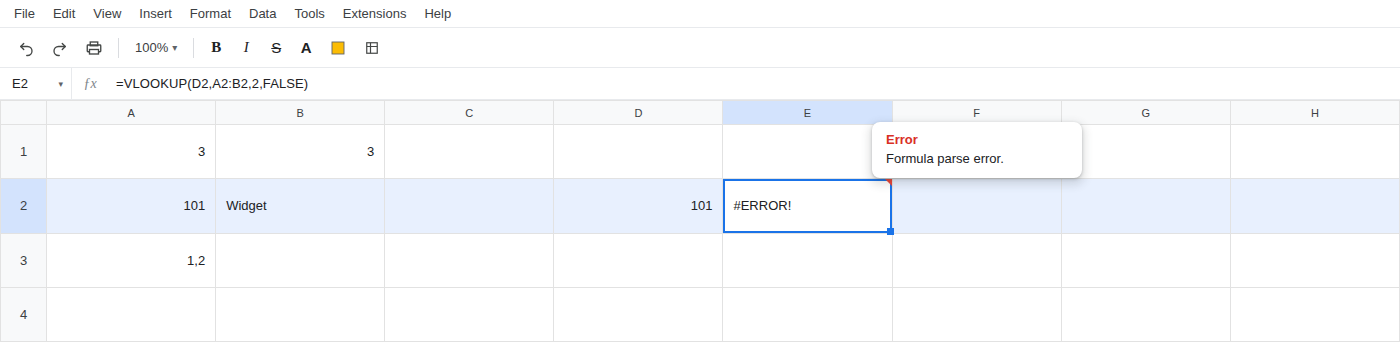
You paste a VLOOKUP from a US tutorial and the cell shows #ERROR!. The tooltip says Formula parse error. The function name is fine. The commas are not.
Recreate it on a blank sheet
Section titled “Recreate it on a blank sheet”- Open a new blank spreadsheet. File > Settings > Locale → Germany (or Deutsch / Germany). Reload the spreadsheet so the locale actually applies.
- In A2 type
101. B2Widget. D2101. In A3 type1,2so the decimal comma is visible on the sheet. Leave A3 out of the formula. - In E2 paste exactly
=VLOOKUP(D2,A2:B2,2,FALSE)with commas. The cell shows#ERROR!. The tooltip is Formula parse error.
What is actually wrong
Section titled “What is actually wrong”- The argument separator follows this spreadsheet’s locale, not the locale of whoever wrote the tutorial you copied.
- US and UK sheets use commas between arguments. Germany uses a comma as the decimal mark, so formulas use semicolons.
=SUM(1,2)is a bad demo. On a German locale that can display as1,2(a decimal) and never error. Four-argumentVLOOKUPis the parse-error you actually get.
Leave E2 as the broken formula so the parse error stays on the sheet.
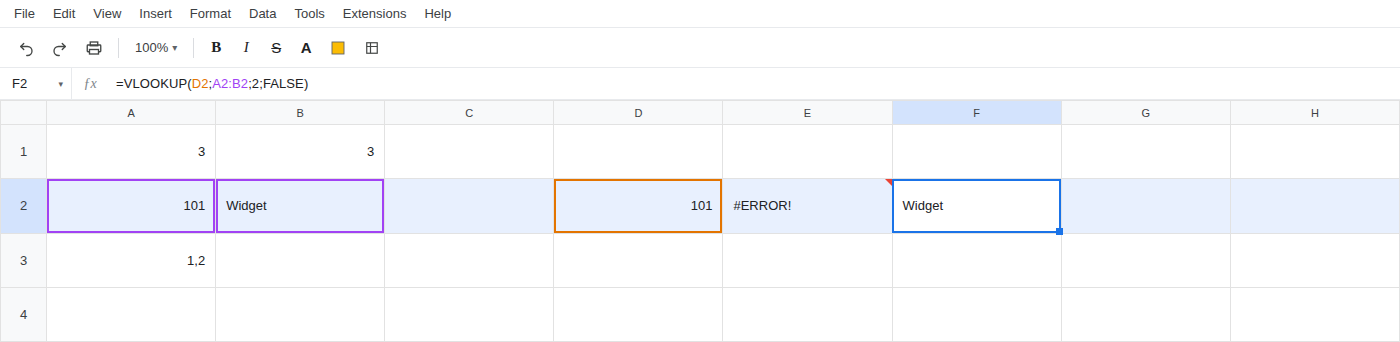
In F2 enter =VLOOKUP(D2;A2:B2;2;FALSE) with semicolons. The cell shows Widget.
Do not change your Google account language. The only settings change is this spreadsheet: File > Settings > Locale, then reload.