
Fix ARRAYFORMULA 0 on empty rows in Google Sheets
An empty qty row still shows 0 after ARRAYFORMULA multiplies the column. That is not a formula error. Sheets treated the blank as 0.
Recreate it on a blank sheet
Section titled “Recreate it on a blank sheet”- Open a blank spreadsheet. Leave the tab named
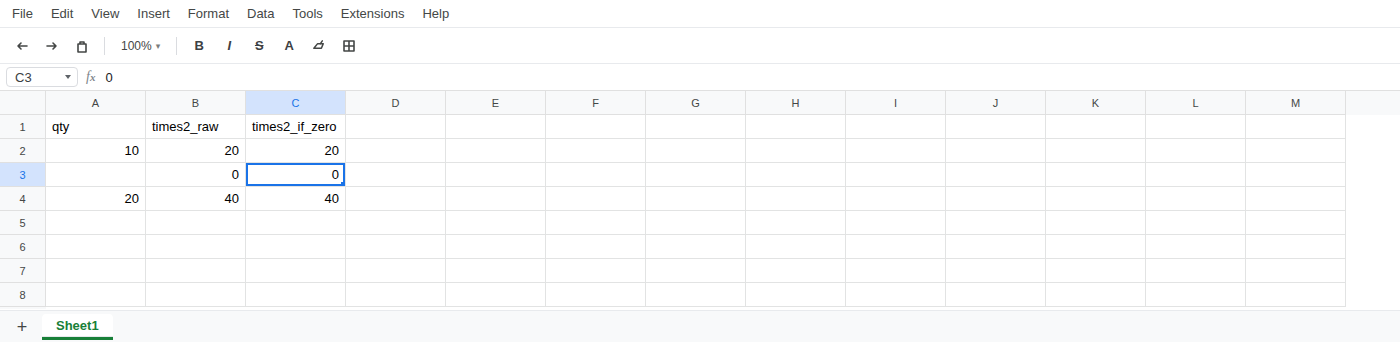
Sheet1. In A1 typeqty, B1times2_raw, C1times2_if_zero. - In A2 type
10as a number. Leave A3 empty. In A4 type20as a number. - In B2 enter
=ARRAYFORMULA(A2:A4*2). The column spills 20, then0, then 40. The middle row is 0. There is no red error triangle.
- In C2 enter
=ARRAYFORMULA(IF(A2:A4="",0,A2:A4*2)). That column is also 20,0, 40. Writing0in the IF empty branch does not make a blank row.
What is actually wrong
Section titled “What is actually wrong”- An empty cell times 2 is treated as 0.
ARRAYFORMULAfills that 0 into the blank input row. - The formula ran. This is ordinary math, not a broken formula.
- Putting
0in the IF empty branch still prints0. The cell is the number zero, not a blank.
Leave B2 and C2 as the broken formulas so the zeros stay visible.
In D1 type times2_if_blank. In D2 enter =ARRAYFORMULA(IF(A2:A4="","",A2:A4*2)). The column spills 20, a blank-looking cell, then 40.
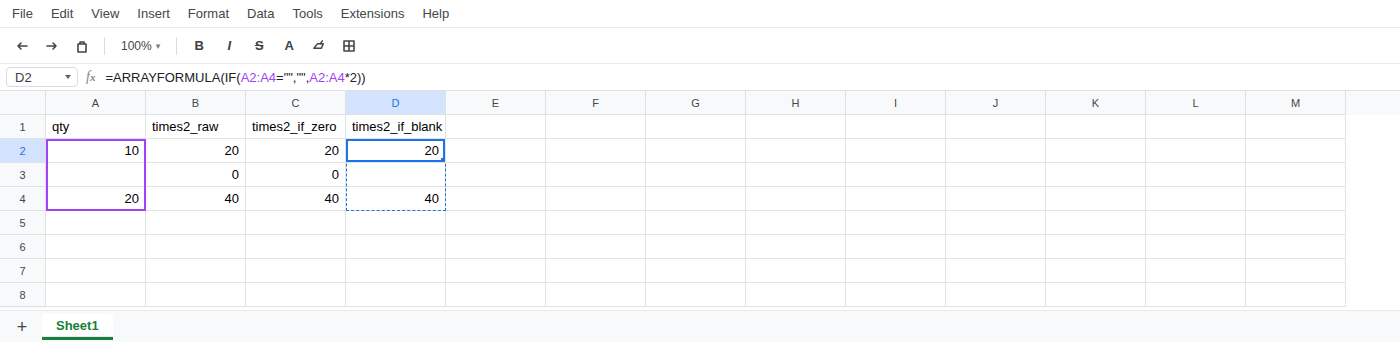
That middle cell is "", an empty string, not a truly empty cell. Do not use 0 as the empty-row result.
If a qty cell is blank, keep the output blank with "". 0 is a value.