
Array result was not expanded because it would overwrite data
UNIQUE can return #REF! even when the source list is sitting on the sheet. The formula is fine. Sheets will not spill into a cell that already has data.
Recreate it on a blank sheet
Section titled “Recreate it on a blank sheet”- Open a blank spreadsheet. In C1 type
apple. C2apple. C3banana. - In A2 type the word
block. Leave A1 empty. - In A1 enter
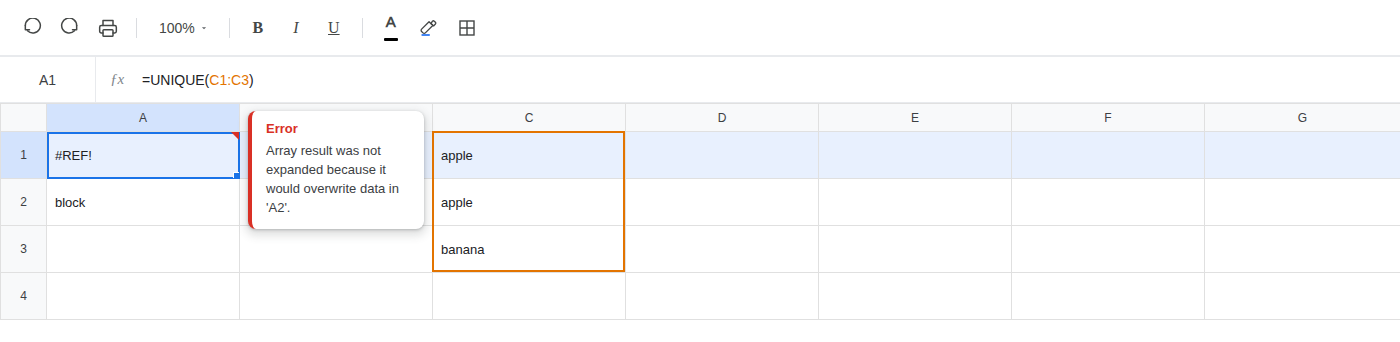
=UNIQUE(C1:C3). The cell shows#REF!. The tooltip is Array result was not expanded because it would overwrite data in ‘A2’.
What is actually wrong
Section titled “What is actually wrong”UNIQUEreturns an array. Here that is two cells: apple, then banana. It needs A1 and A2.- A2 already holds
block. Sheets will not overwrite it, so the whole result stays#REF!in A1. - This is not a deleted reference, not a
VLOOKUPcolumn index past the range, and notIMPORTRANGEwaiting for Allow access. The formula still points atC1:C3. The spill is blocked.
Do not change the UNIQUE formula.
Delete the value in A2 so that cell is empty. A1 stays =UNIQUE(C1:C3). The array spills: A1 is apple, A2 is banana.
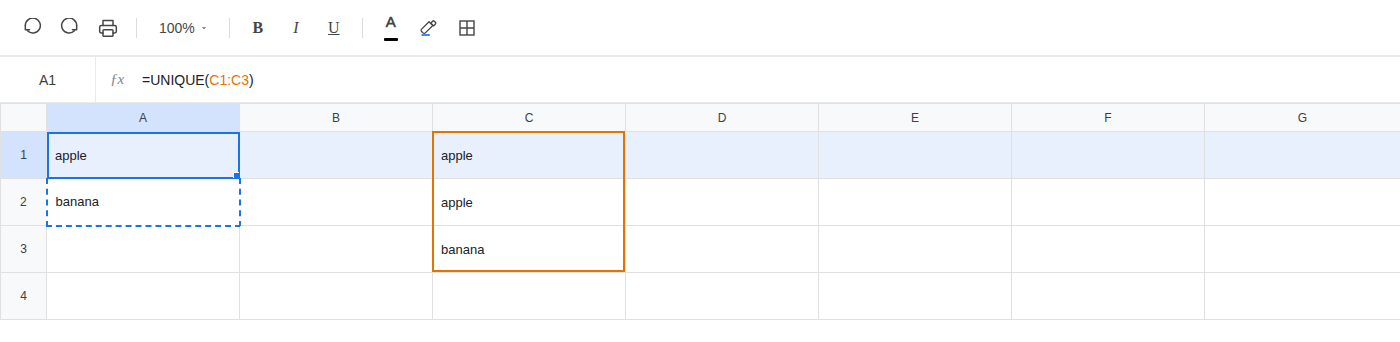
If #REF! is an overwrite, clear the cells in the spill path. Leave the formula where it is.