
Circular dependency detected in Google Sheets
A formula that points at its own cell lands as #REF!. Sheets cannot finish the value. That is a loop, not a missing range.
Recreate it on a blank sheet
Section titled “Recreate it on a blank sheet”- Open a blank spreadsheet. In A1 type
10. - In A2 enter
=A1+A2. The cell shows#REF!. The tooltip is Circular dependency detected. To resolve with iterative calculation, see File > Settings.
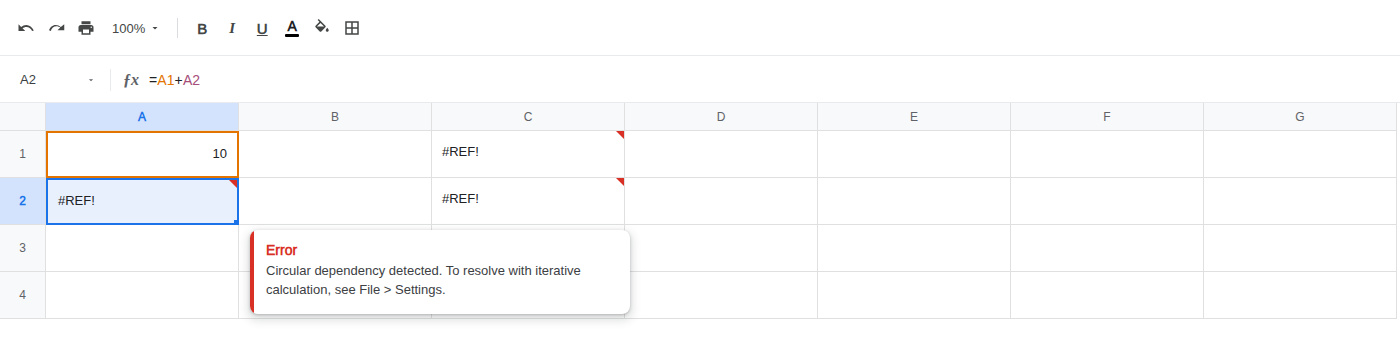
- Two cells can loop the same way. In C1 enter
=C2. In C2 enter=C1. Both cells show#REF!. Each formula depends on the other.
What is actually wrong
Section titled “What is actually wrong”=A1+A2asks A2 for a value that includes A2. A2 is waiting on itself.- C1
=C2and C2=C1is the same cause split across two cells: each formula depends on the other. - This
#REF!is not aVLOOKUPindex past the range, not aUNIQUEspill that would overwrite a cell, and notIMPORTRANGEwaiting for Allow access. The references exist. They form a cycle.
The tooltip points at File > Settings; do not turn iterative calculation on for this error.
Remove the self-reference. Change A2 to =A1. The cell shows 10.
Leave C1 and C2 as they are so the two-cell loop stays #REF! on the sheet.
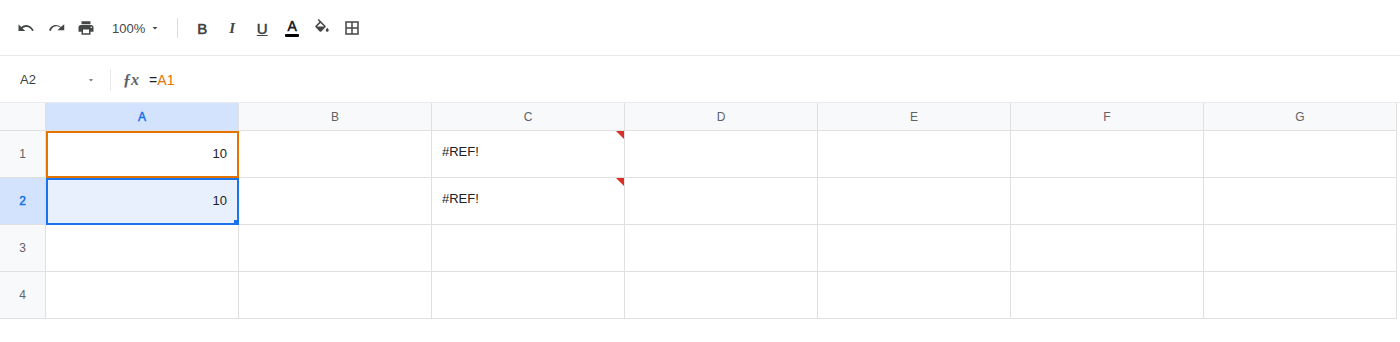
Point the formula at cells that do not depend on this cell.